Claude Fable 5 vs Opus 4.8 for Web Design: I Tested Both (With Prompts)

Pizza Website Prompt
Build a single-file, production-quality landing page for a pizza brand called **Crustino**. Output one self-contained HTML file (inline CSS + JS). No build step. You may use CDN libraries (GSAP, Lenis, etc.) if they improve the result. Mobile-responsive and smooth on all sections.
## CREATIVE DIRECTION — YOU DECIDE
Choose the visual identity yourself based on what suits a modern premium pizza brand: colour palette, dark or light theme, typography pairing, spacing, and motion personality. At the very top of your response, before the code, write a 3-line “Design Rationale” stating the vibe you picked, the fonts, and the palette (with hex codes) — and why. Make bold, opinionated choices; do not play it safe.
## MAKE YOUR MARK — YOUR CALL
Treat the structure below as a strong starting brief, not a locked spec. You have full creative license: if you want to explore and reason about what makes a pizza brand memorable, do it. Improve any section, rethink an interaction, or add a signature moment that ties into the brand name “Crustino” — something people would remember or screenshot. Trust your own judgement. In your Design Rationale, briefly note anything you changed, improved, or added, and why. Keep it cohesive and don’t break what already works.
## STRUCTURE — 5 sections + footer, in this order
### 1. HERO — “Our Top 4 Pizzas – You Need to Taste”
– The 4 pizzas are arranged along a visible CURVE (an arc/wave). Each sits on the curve showing its name + a circular image slot.
– The set AUTO-ROTATES: every ~3s the “active” pizza scales up / highlights and its name is emphasised, cycling through all 4. Hovering pauses; clicking selects.
– The 4 pizzas: **Chicken Blast**, **Molten 4-Cheese**, **Peri-Peri Paneer**, **Veggie Farmhouse**.
– Include a headline, short subline, and a primary “Order Now” button.
### 2. WHY OUR PIZZAS
– A whole pizza sits in the CENTRE, drawn as SVG/HTML/CSS (NOT an image). Keep it visually consistent with the hero pizza style so the site feels cohesive.
– 6 pizza SLICES surround/segment it. On hover/click, each slice OPENS OUTWARD to reveal one feature. Icons for each feature must be SVG or CSS outlines — no images.
– The 6 features: “World’s finest imported cheese”, “24-hour slow-fermented dough”, “Wood-fired stone oven”, “Fresh ingredients daily”, “30-minute delivery promise”, “Our secret house sauce”.
### 3. MENU — pizza menu book that opens on scroll (see attached concept image)
– Initial state: a single circular “pizza menu book”, CLOSED — a full pizza drawn/styled to look like a bound book, with a spiral binding running down the vertical centre and a centred label (“Crustino — Menu Book”). A small “Scroll to open” cue below it.
– On scroll, the book OPENS: the two halves split/swing apart along the central spine (smooth scroll-triggered animation), revealing the menu underneath.
– Fully open state: a horizontal open-book menu page — spiral binding now on the LEFT edge, cream page styling — listing 6–8 pizzas as rows: small square pizza image slot, name, one-line description, price, round “+” add button. Include a “Bestseller” badge on one item and 2–3 category filters (Veg / Non-Veg / Sides) that filter the rows.
– The closed-book pizza and the open-page styling should feel like the same object opening — not two unrelated views. Match the concept image’s book-open behaviour.
### 4. ORDER
– A delivery boy on a bicycle ANIMATES IN FROM THE LEFT of the screen and rides toward the centre (scroll-triggered). The whole rider + cycle should be SVG/CSS — no image.
– Beside it: a short “How ordering works” 3-step flow and an “Order Now” CTA.
### 5. REVIEWS — rebuild the mechanic from the reference site
Reference:
https://sports.withgoogle.com/teamusa/ — study the “Meet the athletes” section on that live page.
Below this prompt I’ve pasted the RAW HTML of that section, copied straight from the site. Important: that HTML has broken asset paths (missing videos/images) and baked-in inline transforms that their scroll engine writes at runtime — so it will NOT work as-is. Do NOT preserve the broken markup.
Instead: study the live page and the pasted HTML to understand the MECHANIC — a sticky, scroll-pinned section where a stack of cards cycles as you scroll (the active card sits front-and-centre at full scale with a slight rotation, inactive cards collapse small behind it), clickable name tabs on the side, and a quote block that cross-fades in sync with the active card. Then REBUILD that scroll mechanic cleanly and correctly for Crustino’s customer reviews — and make it BETTER than the original: smoother scroll (Lenis/GSAP ScrollTrigger), real depth on the stacked inactive cards, refined easing, fully blended into your chosen visual identity.
Use 4 reviews, 5-star, believable pizza-brand copy (reviewer name, a short meta line like “Ordered 32 times”, and a quote). Replace all customer photos with image slots per the IMAGE SLOTS rule.
### FOOTER
– Brand name/logo, quick links, contact + hours, social icons (SVG), copyright.
## IMAGES
You have the Magnific MCP available. Use it to generate the food/customer images and wire them into the design — within Magnific, choose the best available image model for photoreal pizza and portrait shots. Generate:
– Hero pizzas ×4 (Chicken Blast, Molten 4-Cheese, Peri-Peri Paneer, Veggie Farmhouse) — 1:1, circular crop
– Menu item photos — 1:1
– Review customer photos ×4 — 1:1
For any image you don’t generate, leave a styled placeholder with an HTML comment directly above it in EXACTLY this format so it can be filled later:
`<!– IMG: [description] | [ratio] | [WxH]px –>`
Every other visual element (centre pizza, closed-book pizza, slice icons, delivery rider, social icons, decorative shapes) MUST be pure SVG/CSS — no generated images for those.
## QUALITY BAR
Cohesive design system, real micro-interactions, accessible contrast, no lorem-ipsum-looking filler — write believable pizza-brand copy. This is being judged against another top model, so make it distinctive.
—
## RAW REFERENCE HTML — the “Meet the athletes” section (rebuild it per Section 5; do NOT preserve broken markup)
<section data-section=”Athletes” aria-label=”Athletes” style=”height:500dvh”><div><h2>Meet the athletes</h2><div><div aria-current=”true”><div><h3>Shaun White</h3><div><span>U.S. Olympian, Snowboarding</span><span>Three-Time Gold Medalist</span></div></div></div><div><div><h3>Alex Hall</h3><div><span>U.S. Olympian, Freestyle Skiing</span><span>Two-Time Olympic Medalist</span></div></div></div><div><div><h3>Maddie Mastro</h3><div><span>U.S. Olympian, Snowboarding</span><span>Elite-Level Champion</span></div></div></div><div><div><h3>Colby Stevenson</h3><div><span>U.S. Olympian, Freestyle Skiing</span><span>Silver Medalist, Beijing 2022</span></div></div></div></div><div><div style=”transform: translateX(-50%) translateY(-50%) rotate(-2deg) scale(1); z-index: 100;”><div><video muted loop playsinline poster=”athlete_SW_portrait.jpg”><source src=”athlete_SW_portrait.mp4″ type=”video/mp4″></video><button type=”button” aria-label=”Watch”><span>Watch</span></button></div></div><div style=”transform: translateX(-50%) translateY(-50%) rotate(0deg) scale(0.33); z-index: 1;”><div><video muted loop playsinline poster=”athlete_AH_portrait.jpg”><source src=”athlete_AH_portrait.mp4″ type=”video/mp4″></video></div></div><div style=”transform: translateX(-50%) translateY(-50%) rotate(0deg) scale(0.33); z-index: 0;”><div><video muted loop playsinline poster=”athlete_MM_portrait.jpg”><source src=”athlete_MM_portrait.mp4″ type=”video/mp4″></video></div></div><div style=”transform: translateX(-50%) translateY(-50%) rotate(0deg) scale(0.33); z-index: 0;”><div><video muted loop playsinline poster=”athlete_CS_portrait.jpg”><source src=”athlete_CS_portrait.mp4″ type=”video/mp4″></video></div></div></div><div><div><p>[quote 1]</p></div><div><p>[quote 2]</p></div><div><p>[quote 3]</p></div><div><p>[quote 4]</p></div></div></div></section>
The setup
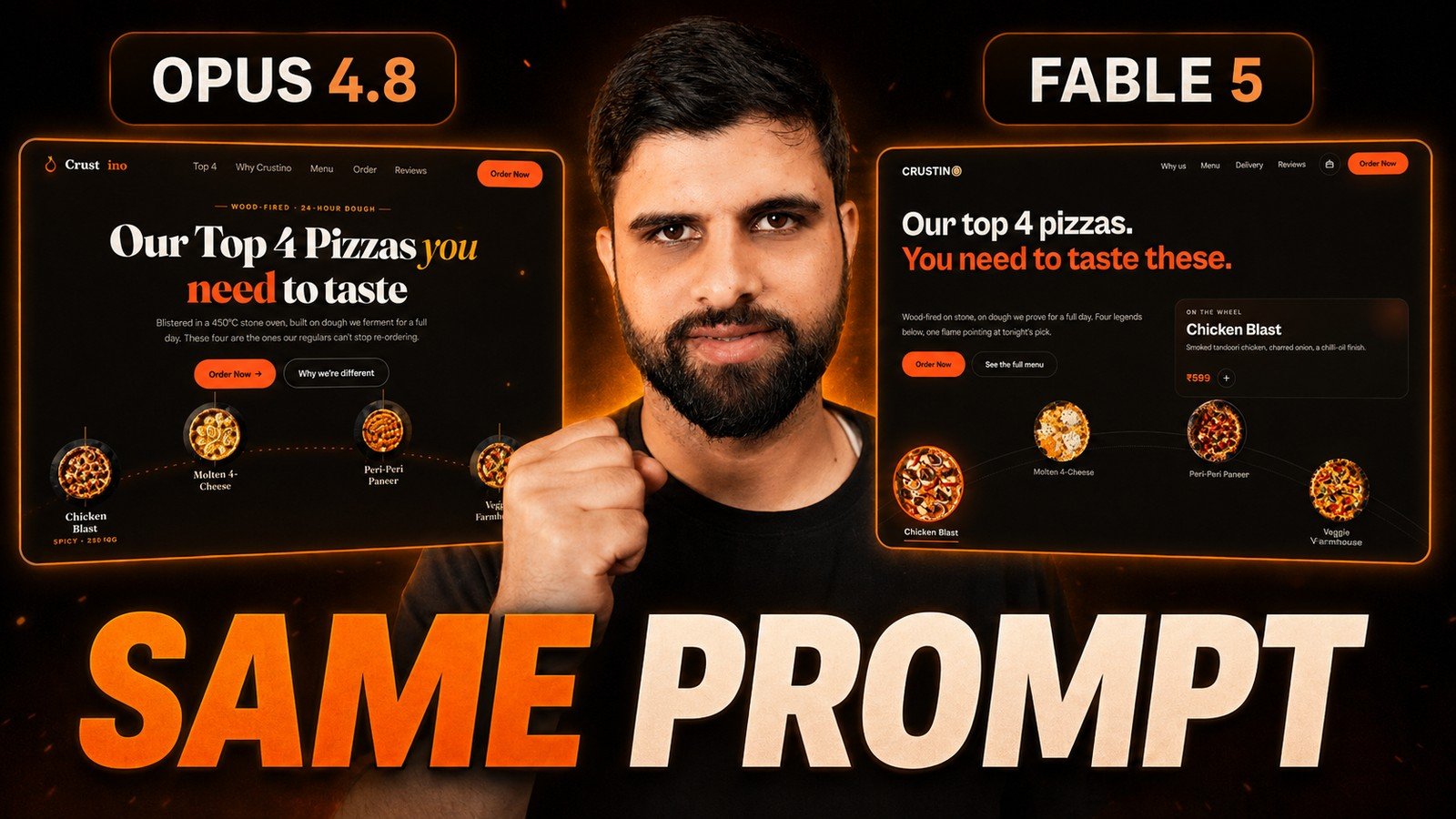
Both models got identical conditions. Same prompt, same references, same effort setting, separate chats so neither could see the other’s work. No back and forth on the first test, just one prompt and one result from each. This is the only honest way to compare Claude Fable 5 and Opus 4.8 for web design.
Test 1: one prompt, one website
For the first test I did not just type “make me a website.” I built a proper prompt with real references, section concepts, and screenshots, then gave that same prompt to both Opus 4.8 and Fable 5 to build a website from scratch.
Opus finished in about 34 minutes using around 27K tokens. Fable took closer to an hour. When I compared the two results side by side, the difference in attention to detail, layout, scroll animation, and polish was clear. I will let you watch the video and decide which one you would ship.
The full one shot prompt is below.
Test 2: a real client redesign with a design skill
For the second test I used a real client site of mine, one that is outdated and due for a redesign. I installed a design skill so both models had a design system to follow, then asked each to redesign the site as a first draft I could show the client.
This time the results were much closer. Each model had strengths, and both missed a key section on the first pass, which I then prompted them to fix. The takeaway: AI gets you a strong starting draft fast, but you still refine section by section to make it client ready.
The redesign prompt and the skill install are below.
FOR THOSE WITHOUT MAGNIFIC MCP
The block above uses the Magnific MCP to generate images automatically. If you don’t have it connected, here are your options.
Connect Magnific (free). Magnific (formerly Freepik) connects to Claude via MCP, and the free plan gives you up to 20 AI images per day on the in-house model, enough for this whole project. Setup:
Or use any other AI image tool. No MCP, or you prefer something else? Generate each image by hand, save it, and drop it into the placeholder. Good free options:
- Magnific / Freepik, 20 free AI images a day
- Google Gemini (Nano Banana), best free option for volume
- ChatGPT, works but low free daily limit
- Any AI image tool you already use
Or use free stock. Prefer real photos? Search “pizza,” “cheese pizza,” “person portrait” on Freepik, Unsplash, or Pexels and drop them into the same slots.
Whichever you pick, keep the placeholder format so every slot is easy to find and fill:<!-- IMG: [description] | [ratio] | [WxH]px -->
And keep the rule from above: only food and customer photos are images. The centre pizza, slice icons, delivery rider, social icons, and shapes stay pure SVG/CSS.